Resources
Browser DLP, secure web gateways and endpoint DLP: where each one stops
Each existing control covers part of the job. Here is what a network gateway, endpoint DLP and Group Policy each miss inside the browser, and why that gap now matters.
7 min read
Why the browser became the blind spot
AI moved work into the browser, and the data followed. Staff paste customer records, financial details, contracts and source code into AI tools, and risky files assemble right inside the page.
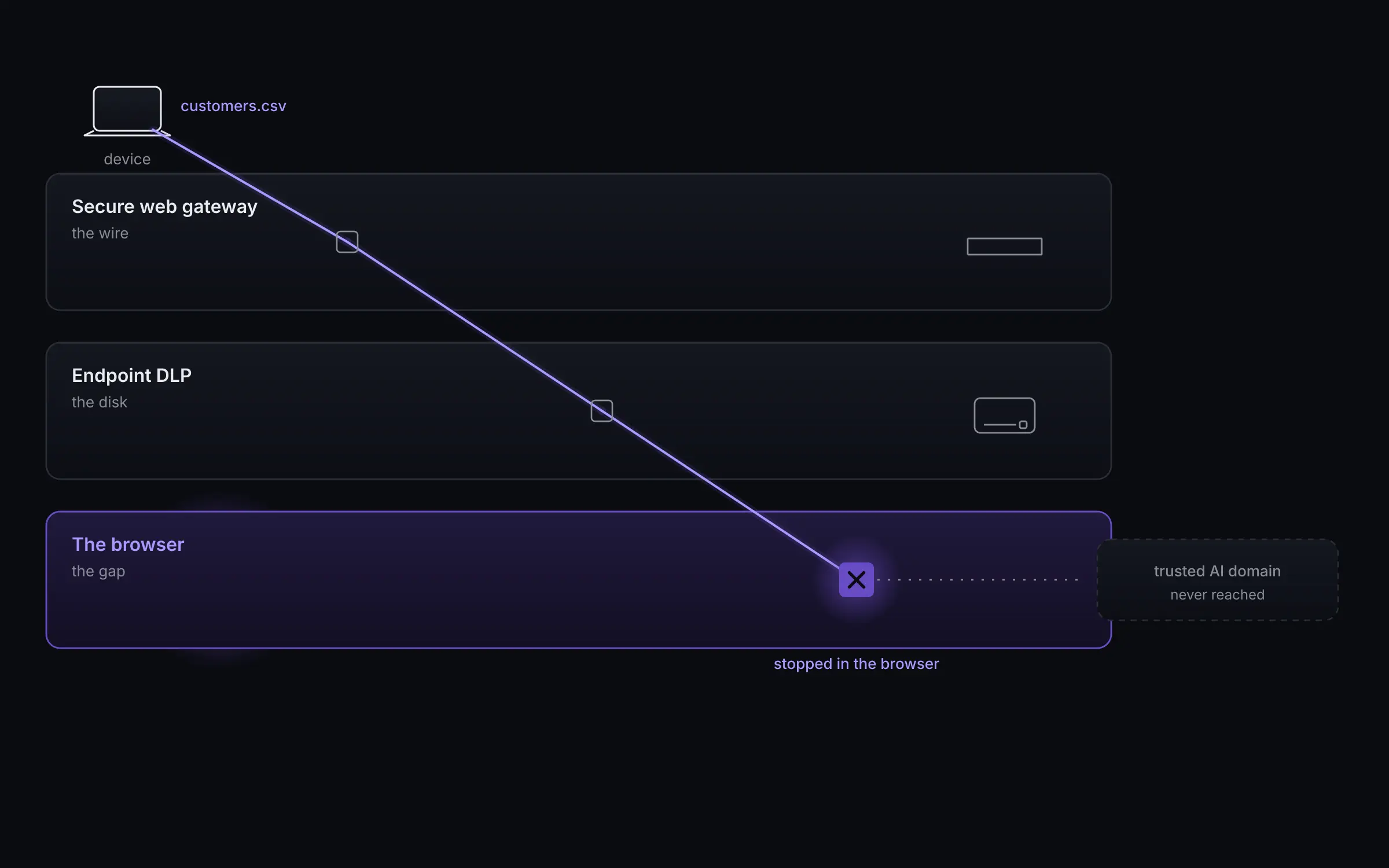
To a network gateway it is all ordinary encrypted traffic to trusted domains, so the gateway and endpoint DLP see nothing worth stopping. The work and the risk now sit in the browser, where none of the older controls governs directly.
45%
of employees now use AI regularly on corporate devices, up from 15% a year earlier
Source: Verizon 2026 Data Breach Investigations Report
What a secure web gateway covers, and misses
A secure web gateway protects the wire. It filters and inspects traffic as it leaves the network, which works well for known bad destinations and for policy on the corporate path.
It assumes the user stays on a healthy corporate network. Traffic to a reputable AI domain looks ordinary, so a paste or an upload into that domain passes. And the gateway itself is a single point of failure. If it goes down, enforcement goes with it.
What endpoint DLP and Group Policy cover, and miss
Endpoint DLP protects the disk. It is strong on files at rest and on data leaving through endpoints, and it can control downloads by content.
Inside the browser its reach is partial. A document pasted into a chatbot, a login approved on a lookalike page, or a file assembled in the page can pass before endpoint DLP has anything to act on. Group Policy sets configuration, but it does not watch what happens at the point of the click.
What browser DLP adds
Browser DLP enforces at the point of use, inside the browser, before the data leaves the device. It decides allow, warn or block at the click, and ties every decision to a named user on a named device.
Because it runs in the browser and on the endpoint, it works off the corporate network, keeps blocking during a gateway outage, controls files by their true type rather than their name, governs browser extensions, and applies policy by department from your identity provider. The table below sets the controls side by side.
What browser DLP does not replace
Browser DLP does not replace your browser or your gateway. Your people keep the browser they already use, and the gateway keeps protecting the wire.
Enforce runs alongside the gateway at all times and governs what it cannot see inside the browser. If the gateway fails, the agent moves traffic to a backup path and keeps enforcing. The two work together rather than one standing in for the other.
Where to start
The browser is the layer the older controls were not built to govern. The practical first step is visibility. Start in watch mode on a group you choose and see what would have been blocked before anything is switched on.
A gateway protects the wire. Enforce governs the browser.
Each existing control covers part of the job. All of them assume the user stays on a healthy corporate network.
See Enforce on your own traffic.
We start in watch mode on a group you choose and show you what Enforce would have blocked before anything is switched on.
Talk to sales